How to prepare for a successful Braze implementation
Published on July 15, 2026/Last edited on July 15, 2026/16 min read


Team Braze
Contents
A successful Braze implementation depends far more on preparation than on build time, and lean startup teams often launch faster than large organizations. While a customer engagement platform implementation is a task that many teams find daunting, brands can move quickly when they prepare the right way and have the right support.
This guide covers what to prepare before you start, what the process looks like step by step, and how startup customers have launched quickly and seen early results with Braze.
TL;DR
- A successful Braze implementation depends far more on preparation than on build time.
- The work runs across two parallel tracks: a technical track (SDK integration, data validation) owned by an engineer, and a marketing track (channels, journeys, content) owned by a marketer.
- There's no fixed multi-month timeline. Speed comes down to how clean your customer data is and how quickly engineering can schedule the work.
- Prepare before kickoff by defining one primary KPI, mapping your data sources and identity model, choosing a single first use case, naming your owners, and readying your creative.
- Startups like Pazza Pasta (live in two days), CarpeDM, and Cleo show that starting small with one use case, then expanding, is what produces a fast, clean launch.
What a Braze implementation actually involves
A Braze implementation has a few core phases. For example, implementing typically consists of:
- Identity strategy (External IDs, aliases, anonymous user handling)
- Data ingestion (SDKs, APIs, Cloud Data Ingestion or CSV)
- Event and attribute modeling
- Channel enablement
- Personalization layer (Liquid, Catalogs, Connected Content)
- Journey orchestration with Canvas
The work runs on two tracks simultaneously. One is technical, the other is marketing. They rely on each other, but neither sits idle waiting for the other to finish, and that's where lean teams find speed they didn't expect.
The tech track
The tech track is everything that ensures customer data is accurately entered into Braze. It needs an engineer, or at the very least a technical point of contact who can own it from start to finish. The work covers:
- SDK integration
- Event instrumentation
- User attribute mapping
- API connector setup
- Data validation
This track sets the pace for everything else. The base SDK integration is designed to be quick, often a day or less, and allows Braze to collect basic device and session data right away. The part that rewards planning is deciding which events and attributes to capture, since that runs on engineering sprint cycles rather than Braze configuration. A startup with clean customer data and a clear data plan moves through it fast. Data integration is the step worth giving time to, because everything downstream builds on it.
Note: A single SDK implementation unlocks multiple engagement capabilities simultaneously, including push notifications, in-app messages, Content Cards, Banners, Feature Flags, session tracking, device attributes, and automatic analytics collection.
The marketing track
The marketing track is the work a marketer or project manager owns directly. Braze is a marketer-operated platform, so once the data layer is even partially live, this track can start without waiting on full technical sign-off. It covers:
- Channel setup
- Audience segmentation logic
- Journey design
- Content and template creation
- Testing protocols
Small teams benefit most from running these tracks together. A marketer can build segments, draft templates, and map a first journey while engineering finishes validation. Two people covering the two tracks move through a startup-scale build at a pace larger organizations rarely manage.
Braze implementation timelines
There's no fixed multi-month default. A Braze implementation timeline at startup scale comes down to preparation quality and engineering availability.
Teams that arrive with clean, accessible customer data and a single clear use case can generally move fast. Teams that skip the data work can stall, however small they are. Brands moving off an existing platform also have transition mechanics to plan for, which is why migrating to Braze is best handled as its own exercise, separate from a first-time build.
The table below gives a rough shape of what each phase can look like at startup scale.
Phase | Owner | Typical duration (startup scale) |
|---|---|---|
Data and SDK integration | Tech track | Base SDK setup can often take a day or less; full event and attribute mapping runs on your engineering sprint schedule |
Channel setup | Marketing track | Can start as soon as the data layer is partially live, in parallel with the tech track |
First journey build | Marketing track | Depends on how much creative and journey logic you’ve prepped in advance |
Launch and first measurement | Both | Follows as soon as the first journey is tested and the data is flowing cleanly |
How to prepare before you start
Preparation is where a fast launch is won or lost. The teams that move quickly have their data and first use case ready before beginning.
Treat this as your implementation checklist. Work through both before kickoff and the build itself gets much shorter.
Define your goals and primary KPI first
Decide what success looks like before you build. Pick one primary KPI for your first launch, whether that's activation rate, 30-day retention, or repeat purchase, and let it drive every decision after.
A single metric keeps a small team focused. It tells you which use case to start with, which events to track, and how you'll know the first journey worked. Vague goals stretch implementations out, since every choice becomes a debate without a number to settle it.
Data readiness
Getting your data right is the part teams most often underestimate, and it's where implementations can slow down. Braze reads from the data you send it, so the cleaner that data is going in, the faster everything downstream moves.
Work through this before kickoff:
- Audit your existing data sources. List every place customer data lives: CRM, product database, mobile and web analytics, support tools. Note what each does today and whether it's likely to change.
- Guidance around event taxonomy and data modeling. We provide practical examples like product_viewed, checkout_started, subscription_plan, etc to help solve common implementation challenges that customers face. Outside of eCommerce events, we can also support the customer through defining which custom events they need for their marketing use cases
- Define your user identity model. Pick your unique identifier (GUID, UUID) and confirm it's consistent across every system. A consistent identifier saves you real work later, since changing it afterward means starting a fresh profile.
- Map the customer events you need to track. Decide which behaviors matter, for example account_created, item_purchased, or onboarding_step_completed. These are the behavioral triggers your journeys run on.
- Confirm your data pipeline. Decide how data reaches Braze: the Braze SDK directly, a CDP like Segment or mParticle, or server-side API calls. Each carries different engineering requirements, so settle it early.
- Identify PII and compliance constraints. Know what data can and can't flow into Braze before anyone starts sending it.
You don't need to copy everything from your CRM, warehouse, or CDP into Braze. Send the data that powers messaging and let the rest stay where it lives. Braze adds at the activation layer so you don’t need to rebuild your stack. The Braze Data Platform is built to sit alongside your existing sources, not duplicate them.
Use case readiness
Start with one use case, not ten. Pick a single journey tied to your primary KPI, build it well, and treat it as the model you reuse for everything after.
A welcome series, an onboarding flow, or a cart-abandonment journey all work as a first use case. It needs to be contained enough to launch quickly and measurable enough to prove value. Once it works, the next use cases move faster, because you've solved the setup, the data mapping, and the testing once.
The same logic applies to channels. Activate them one at a time. Get email working and measured before you add push, then in-app after that. Sequencing keeps a small team in control and makes it clear which channel drove which result.
From a technical standpoint, implementation sequencing can look like:
- Phase 1 : SDK, Identity, Core Events, One Channel, One Canvas
- Phase 2: Additional Channels, Liquid Personalization, Catalogs, Connected Content
- Phase 3: AI, Experimentation, Advanced integrations
Line up your owners
Name who owns what before kickoff. Implementation needs a technical owner for SDK integration and data work, and a marketing owner for campaigns and journeys. Confusion over that split is a common reason timelines slip.
For a startup, this can be two people. One engineer or technical point of contact handles instrumentation and validation. One marketer or PM handles segmentation, journey design, and content. Clear ownership across the two tracks lets them run in parallel.
Prepare your creative and templates
Have your first-launch creative ready before the journey goes live. Draft the copy, build the message templates, prepare the assets, so the marketing track isn't held up waiting on content once data is flowing.
With templates ready, the gap between a working data layer and a live first campaign launch shrinks to days. Go in with the data mapped, the use case chosen, and the creative prepared, and kickoff becomes execution.
Your pre-launch checklist at a glance
Use this pre-launch checklist as the final sweep before kickoff.
Area | What to prepare | Why it matters |
|---|---|---|
Goal and primary KPI | Pick one primary KPI for your first launch (activation rate, 30-day retention, repeat purchase) | A single metric tells you which use case to start with, which events to track, and how you'll know it worked |
Data sources | Audit every place customer data lives: CRM, product database, mobile and web analytics, support tools | You can't send what you can't find; knowing your sources is the base layer for everything |
User identity | Confirm one unique identifier (email, UUID, or phone) that's consistent across every system | A consistent identifier can save you real work later. |
Customer events | List the behaviors to track, for example account_created, item_purchased, onboarding_step_completed | These are the behavioral triggers your journeys run on |
Data pipeline | Decide how data reaches Braze: the Braze SDK directly, a CDP like Segment or mParticle, or server-side API calls | Each carries different engineering requirements, so settling it early avoids rework |
Compliance | Identify PII and any constraints on what data can flow into Braze | Knowing the limits before you send help you keep you clear of problems at launch |
First use case | Choose one journey tied to your primary KPI (welcome series, onboarding flow, cart abandonment) | One contained use case launches fast and becomes the model you reuse |
Owners | Name a technical owner for SDK integration and data, and a marketing owner for campaigns and journeys | Clear ownership across the two tracks lets them run in parallel instead of waiting on each other |
Creative and templates | Draft copy, build message templates, prepare assets for the first launch | With creative ready, the gap between a working data layer and a live first campaign launch shrinks to days |
The Braze onboarding process for startups, step by step
Startups that launch quickly take it one step at a time. They work on their data first, then a single channel, then one journey they can build and test. Braze onboarding follows that same order, and sticking to it will help you build momentum and stay on course.
Here's the whole sequence at a glance before we walk through it:
Step | What you do | What it takes |
|---|---|---|
1 | Integrate your data and the SDK | Engineer or technical POC; clean data sources and a confirmed pipeline |
2 | Connect your first channel | Marketer or PM; channel chosen and configured |
3 | Build and test your first journey | Templates ready, primary KPI set, test plan in place |
4 | Launch, measure, and iterate | Live audience, reporting set up, room to adjust |
Step 1: Integrate your data and the SDK
Start by getting customer behavior flowing into Braze. This is the SDK integration and data work, and it's the foundation every later step reads from.
Your engineer or technical point of contact instruments the SDK, maps user attributes, and validates that events arrive correctly. After integration, they can help you validate your data through things like user search, data settings to check types/schema, and logs within the dashboard (message activity log/events test user.)
Nothing else is worth building until data lands cleanly, so this is the step to get right rather than rush. For a startup at an early growth stage, that often means a smaller, cleaner data set than an enterprise carries, which is part of why lean teams clear this step quickly.
Step 2: Connect your first channel
Pick one channel and set it up. Email, push, or in-app, whichever maps to your primary KPI and reaches your users where they already are.
One channel can keep the build contained and the learning curve gentle. Your marketer configures it directly, since Braze is built for marketers to operate without constant engineering support. The ease of use here is what lets a single person own the channel end to end. Add the next channel only after the first one works.
Step 3: Build and test your first journey
Build one journey tied to your primary KPI, then test it before anyone receives it. This is where preparation pays off, because the templates and use case you readied earlier slot straight in.
Map the journey logic, drop in your prepared creative, and run it against test profiles to confirm the triggers, timing, and content all behave. A short, deliberate test cycle helps you launch with confidence. It can catch the small things while they're easy to fix and keep that first impression clean.
Step 4: Launch, measure, and iterate
Launch the journey to a real audience, measure against your primary KPI, and adjust. This first launch is your proof point, and getting to it quickly allows startups to achieve early time to value.
Start small. A contained first campaign launch can give you clean numbers and a clear read on what worked. Once the first use case proves out, you reuse the same model for the next one, then add the next channel. Plenty of startups have run exactly this play, and their results are the best argument for it.
How startups have launched quickly on Braze
Everything so far has argued that preparation, not build time, sets the pace. These three teams are the evidence. Each one was small, each picked a single use case, each had its data ready to feed that use case, and each ran the technical and marketing work in the lean two-track way we described rather than waiting for perfect conditions. Their setups differ, which is the useful part: the same groundwork produces fast launches across very different starting points, and it's the kind of start Braze for Startups is built to support.
1. Pazza Pasta serves up a fresh channel in two days flat
Pazza Pasta is a brand from Circus Group, a Germany-based company using AI, robotics, and proprietary software to shake up food delivery. The marketing team is two people, which makes it about the clearest test of whether a lean team can move fast.
The starting point
Pazza Pasta wanted to reach their most engaged customers on WhatsApp. They needed a way to expand to the channel and create compelling campaigns without leaning on too many resources. With a two-person team, anything that demanded heavy engineering time was a non-starter.
What they prepared
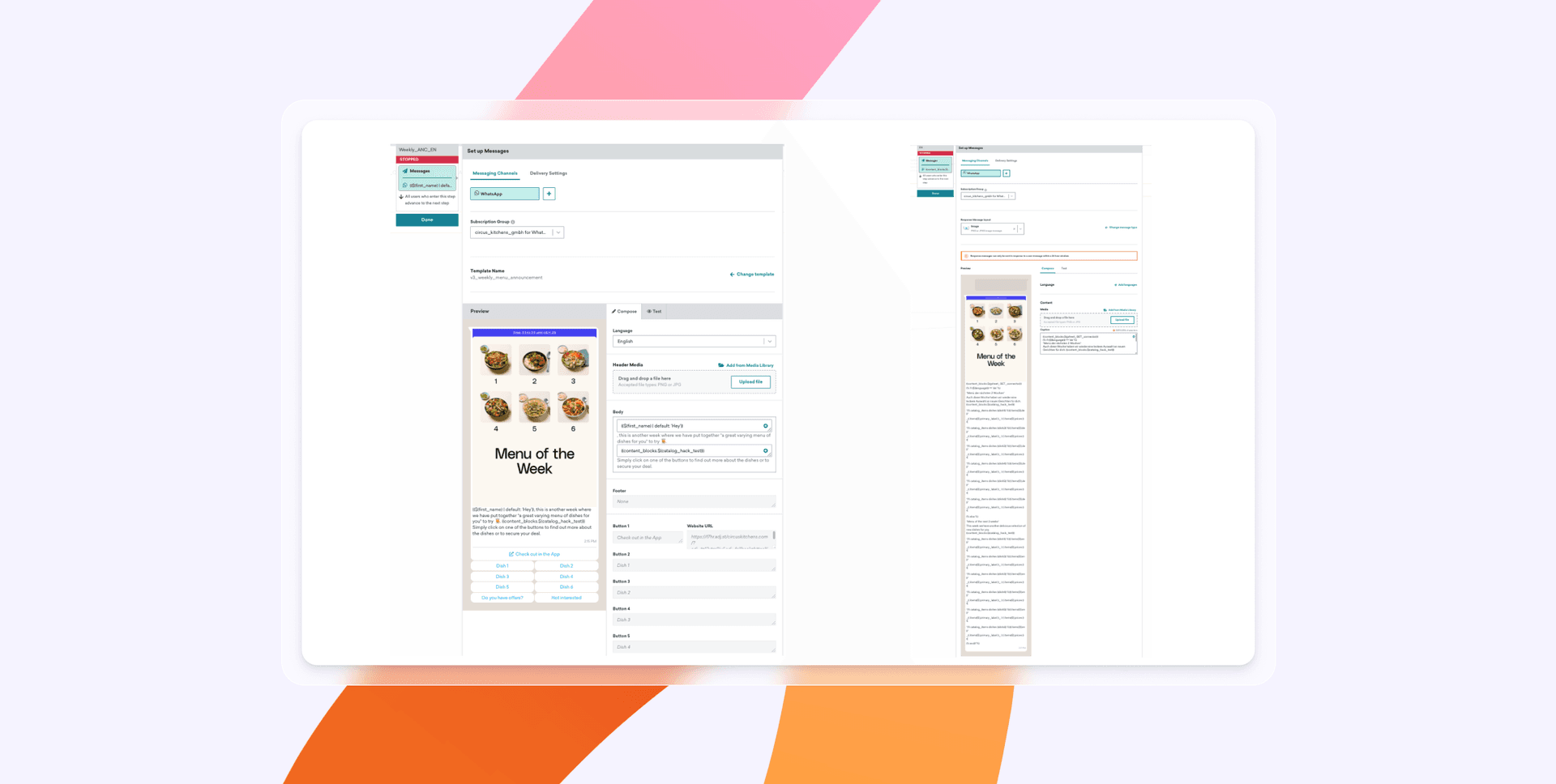
The use case was contained: A weekly menu campaign. The data behind it was ready to feed that use case, with dish names and images sitting in a Google Sheet synced to Snowflake, which updates a Braze Catalog automatically through Braze Cloud Data Ingestion. Native WhatsApp support meant no separate integration to build on the tech side, and the team assembled the whole campaign in Braze Canvas so it regenerates each week off a single sheet update.
How fast they launched
It took two days to get up and running. The team later beta-tested AI Item Recommendations to send personalized dish suggestions, building on the same setup rather than starting over.
The outcome
- 6X higher purchase rates on WhatsApp compared to email for the weekly menu campaign
- 4.5X higher conversion rates (product added) compared to email on new product announcements
- 50% app open rates for their Black Friday campaign
- Automating the weekly campaign saved the team 12 hours of work every week
2. CarpeDM converts sign-ups into matches with a four-month build
CarpeDM is a member-only, video-first dating community created for accomplished Black women and those seeking meaningful relationships with them. The case study describes CarpeDM as a startup whose acquisition and engagement challenges came from an intentional, more involved onboarding process that includes profile reviews, consultations with human matchmakers, and background checks.
The starting point
CarpeDM saw user drop-off and weak engagement in that multi-step onboarding. A slower, no-swiping experience asked more of new users than a typical dating app, and the team needed to keep people moving through each stage without overwhelming them.
What they prepared
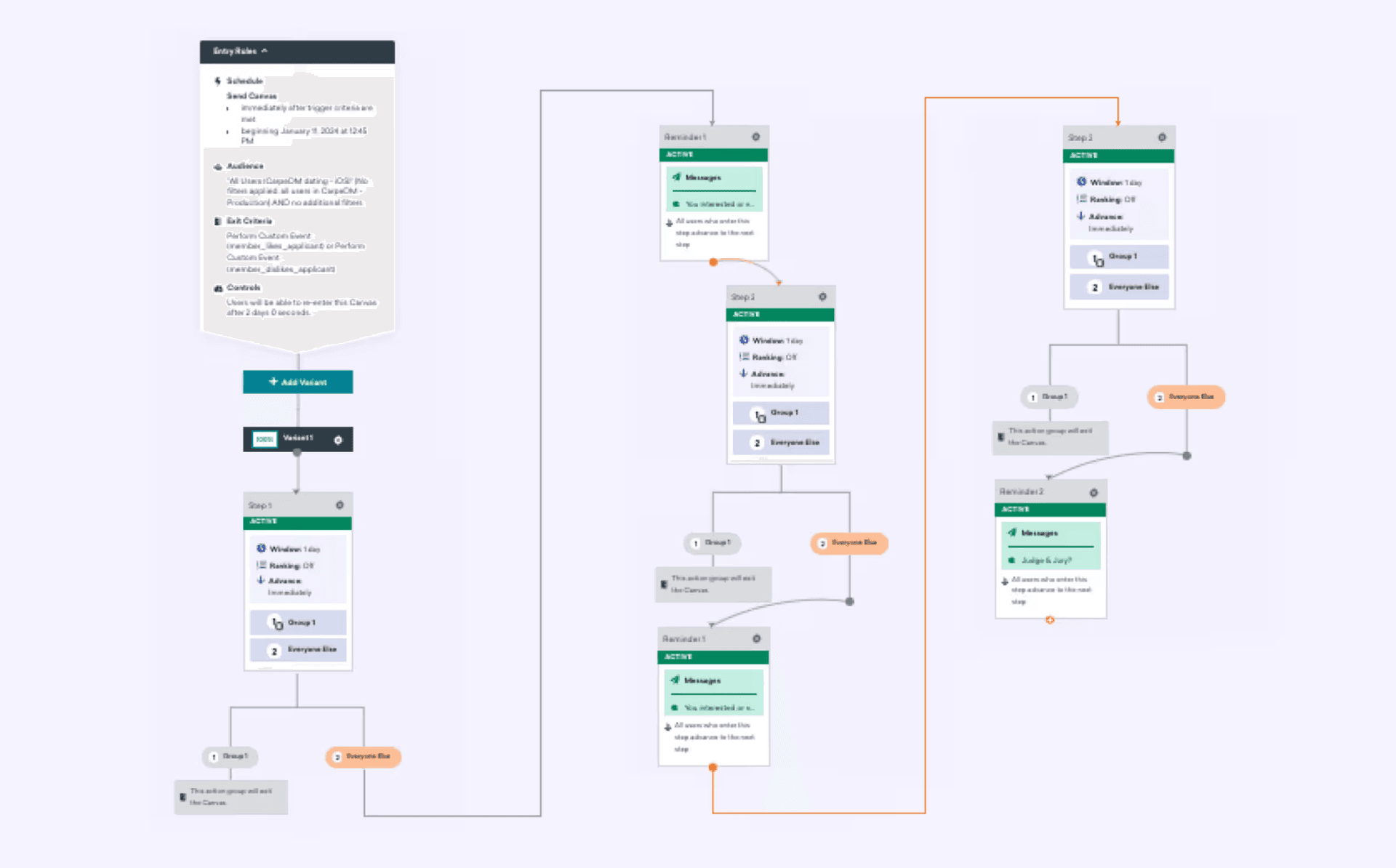
CarpeDM started where the process says to: one use case, onboarding, tied to a clear conversion goal. They joined Braze through the Tech for an Equitable Future program, which gave the company 12 months of free platform access and expert support. Owners were defined from the start, with a CMO, a product manager, and an analyst running the testing. The build used Braze Canvas across push, email, and SMS, with custom events tracking actions like profile reviews and matchmaker consultations, and Action Paths tailoring each journey so applicants weren't bombarded.
How fast they launched
The team ideated and launched these campaigns within four months, a window that covered internal product development and testing as well as campaign setup and launch.
The outcome
- 84% engagement rate in the profile review process, well above their 60% goal
- 15% new customer conversion rate from the engagement campaigns
- 86% success rate with members who decide to remain matched after their first video dates
3. Cleo rebuilds a welcome series without borrowing an engineer
Cleo is a global family care platform offered as an employee benefit, supporting members through pregnancy, newborn care, raising children, and caring for aging parents. A small-but-mighty marketing team is responsible for making every member feel like the product is built for them.
The starting point
Cleo's original welcome series went to everyone, so it used deliberately vague messaging and broad value propositions to avoid sending members content that wasn't relevant. Building a personalized version meant writing complex, multi-attribute Liquid logic, which sat beyond what the lifecycle marketing manager felt she could code alone.
What they prepared
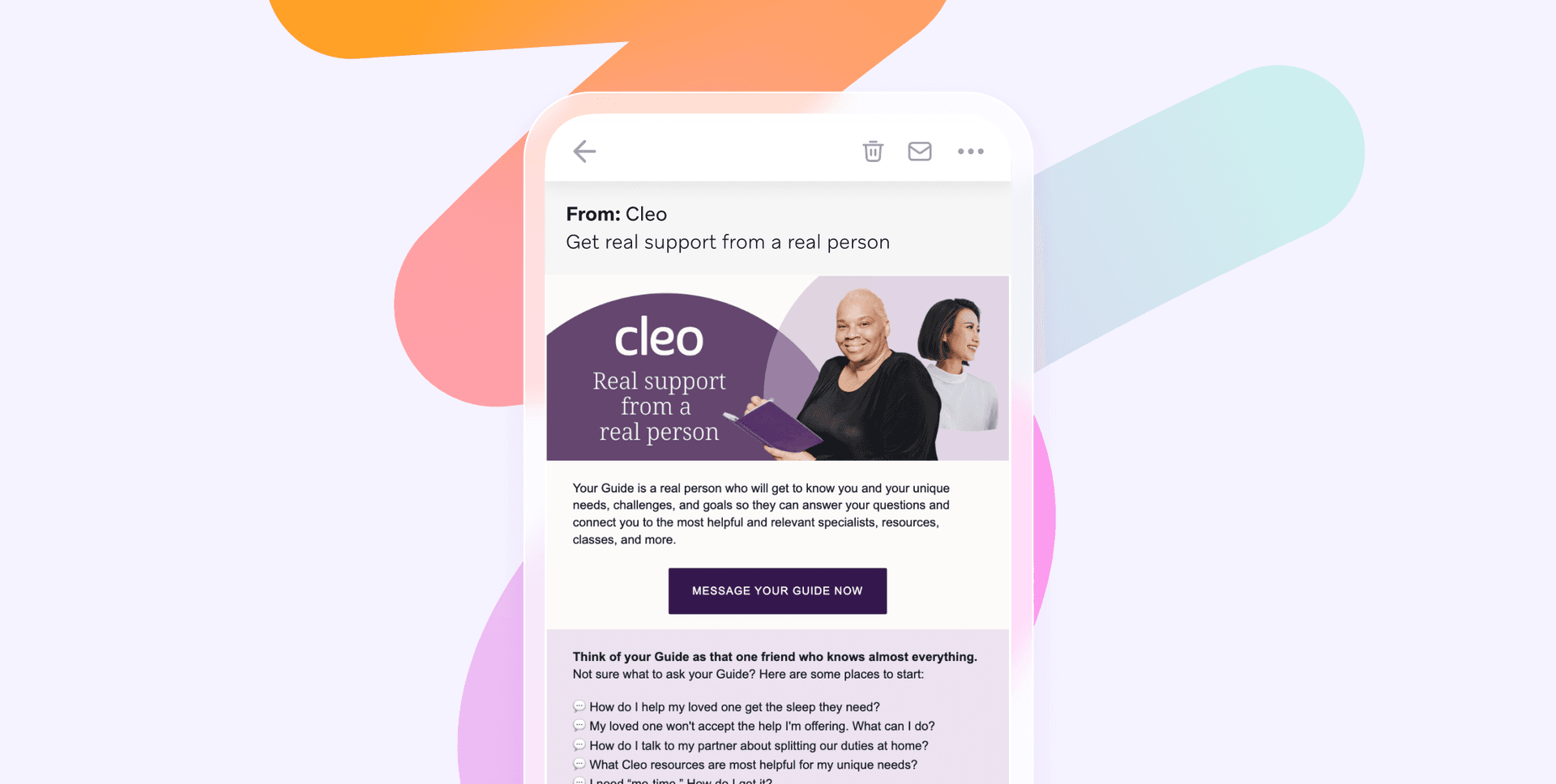
The groundwork was the data. Cleo's rich member data, including care recipient ages, package types, and self-selected support topics, was already there to build on. Rather than open a ticket and wait on engineering, the lifecycle marketing manager used BrazeAI Operator, an AI assistant built into the Braze dashboard, to write and debug the Liquid powering a personalized welcome experience that adapts to each member's care recipients, package type, and life stage.
How fast they launched
The speed came from removing the usual bottleneck. With Operator handling the code, the marketer built the personalized series herself instead of queueing behind engineering, and Operator even anticipated edge cases, rewriting the logic so a member with two teenagers wouldn't see the same content block render twice.
The outcome
- 81% reduction in unsubscribes for the welcome series
- 97% drop in opt-outs on the first email
- 284% increase in app opens
- 124% lift in push notification engagement
Common implementation mistakes to avoid
Some of the most common implementation mistakes are easy to avoid once you know what they are. They tend to be the inverse of the preparation we've covered, so steering clear of them is mostly a matter of sticking to the plan. Watch out for these four.
- Launching every channel and use case at once. Trying to stand up email, push, in-app, and SMS across several journeys in week one spreads a small team thin and muddies your results. Sequence instead. One channel, one use case, measured and working, then expand.
- Starting without a defined primary KPI. With no single metric to aim at, every choice becomes a debate and scope creeps. Pick the one number your first launch is responsible for, and let it decide what you build and what you leave for later.
- Under-preparing the data layer. Solid data underneath your campaigns is what keeps everything above it running smoothly, so audit your sources, settle your user identifier, and confirm your pipeline before anyone builds on top of it.
- Skipping the test phase. A quick test pass before you send keeps that first impression clean. Run the journey against test profiles, confirm the triggers and timing behave, then launch.
A quick, clean start is the norm for a Braze implementation when the prep is done well.
Braze implementation FAQs
How long does it take to implement Braze?
How long a Braze implementation takes for a startup depends on preparation quality and engineering availability, not a fixed schedule. Teams with clean customer data and one clear use case can generally move quickly, since the technical track runs on engineering sprint cycles while the marketing track builds in parallel rather than waiting for full sign-off.
How do startups prepare for a Braze implementation?
Startups prepare for a Braze implementation by defining a primary KPI, mapping where their customer data lives, and choosing one first use case instead of launching everything at once. They also assign clear owners for SDK integration and campaign building, and ready creative templates before the first journey goes live.
What do you need before starting a Braze implementation?
Before starting a Braze implementation you need a defined goal and primary KPI, a clear picture of your customer data and its sources, a chosen first use case, and named owners for the technical and marketing work. Having creative and messaging templates ready helps keeping the first launch from stalling.
Is Braze hard to set up for a small team?
Braze is not hard to set up for a small team. It's a marketer-operated platform, so once the data layer is partially live, a marketer can build segments, journeys, and templates without constant engineering support. Lean teams often launch faster than large organizations working through legacy systems and approvals.
How quickly can a startup launch its first campaign in Braze?
A startup can expect to see early results within weeks of launching its first journey, provided the data is ready and one use case is in focus. Pazza Pasta got up and running in two days and drove higher purchase rates on WhatsApp than email, which shows a contained first launch can produce measurable results soon after going live.
Related Tags
Be Absolutely Engaging.™
Sign up for regular updates from Braze.
Related Content
 Article9 min read
AI marketing use cases: Eight ways brands put AI to work
July 14, 2026 Article12 min read
AI-driven marketing strategies: How leading brands use AI to scale 1:1 customer relationships
July 09, 2026 Article11 min read
Email and SMS marketing: How to build a combined cross-channel strategy
July 09, 2026