The new inbox reality: How iOS changes are reshaping email marketing
Published on December 20, 2025/Last edited on December 20, 2025/6 min read

Aparna Prasad
Senior Product Marketing Manager at BrazeThe world of email marketing is in a constant state of flux, but few changes have created as seismic a shift as Apple's recent iOS updates. What started with Mail Privacy Protection (MPP) in iOS 15—which rendered the beloved open rate metric unreliable—has continued with new features in iOS 17, iOS 18 (which introduced Apple Intelligence), and iOS 26, challenging traditional email marketing practices to their core.
For email marketers, these changes aren’t just technical hurdles; they’re a fundamental prompt to re-evaluate what true customer engagement looks like in order to remain relevant in the inbox. Here’s a look at how recent iOS updates are impacting email marketers and the essential strategies they must adopt to thrive in this new landscape.
The impact: What’s changed in the Apple Mail inbox
Apple Intelligence
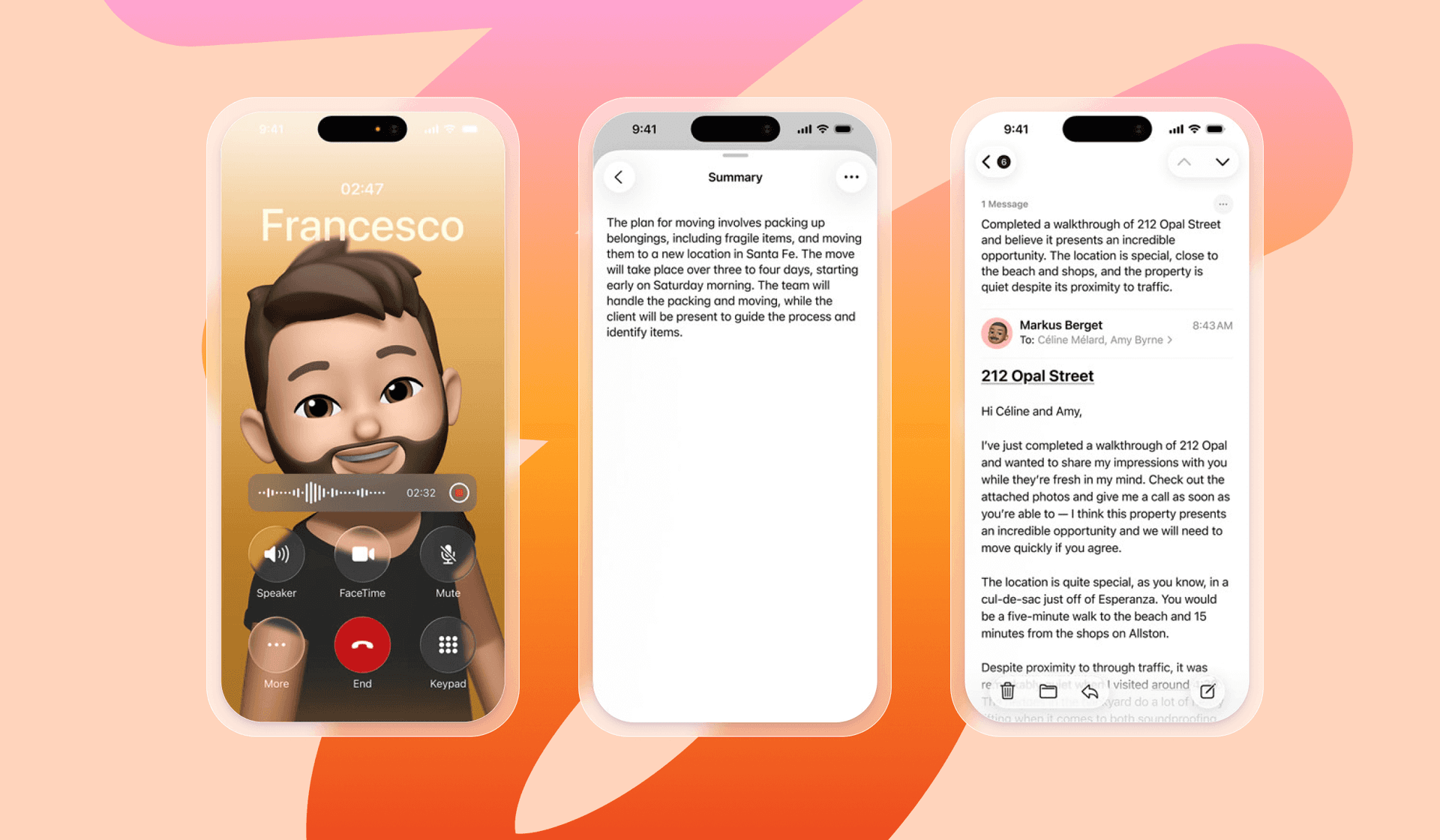
Apple Intelligence (introduced with the launch of iOS 18, and then expanded with iOS 26) automatically creates AI summaries in the inbox and inside the actual email. A user might read the AI-generated preview before deciding to open the full email. If this summary, which now also replaces or reinterprets your carefully crafted pre-header text, is vague, misleading, or doesn't showcase value, the email may be dismissed without an open. The first impression of your email is now often controlled by how AI perceives it, so marketers need to rethink how they write preview text.
Inbox categorization and Digest View
Recent iOS updates have introduced changes that affect mostly email visibility within the inbox. With Categorized Tabs (iOS 18), Apple Mail now sorts emails into tabs like Primary, Transactions, Updates, and Promotions, similar to Gmail and Yahoo. Most marketing emails will land in the Promotions tab, which users may check less frequently than their Primary inbox, potentially leading to a drop in engagement. However, a promotional email does belong in the Promotions tab, and if your email delivers value, customers will know exactly where to find you.
With Digest View, emails from the same brand are grouped together into a single thread, which means recipients aren’t seeing your newest email in its entirety, making it harder for your brand to appear frequently, stand out, and get your message across. Therefore, it’s important to find the right sending frequency so that your own brand thread doesn't get so long that people miss your emails.
Link Tracking Protection
Apple’s Link Tracking Protection (LTP) originally rolled out with iOS 17 and expanded across Safari and Apple Mail in iOS 18. This feature automatically strips identifiable tracking parameters from URLs (such as fbclid or proprietary user-level IDs) when a user clicks a link from Apple Mail or in Private Browsing mode. This makes it significantly harder to tie a click in your email to subsequent website activity, complicating cross-channel attribution and the ability to connect email engagement to advertising campaigns.
What email marketers should do to respond
This new landscape can feel overwhelming. With AI-generated summaries and shifting inbox behaviors, there’s no magic, one-click fix to rely on. But the good news is that strong marketing fundamentals still matter more than ever. By focusing on timeless principles like clear value, thoughtful segmentation, first party data strategies, and authentic connection, marketers can regain their footing and navigate these changes with confidence. Here are four key strategies to adapt and thrive.
1. Double down on value and content quality
With new inbox sorting and AI summaries, a strong sender reputation and highly relevant content are the best ways to ensure visibility.
- Focus above the fold: Your subject line and preview text are now more critical than ever. Ensure they are unique, value-driven, and clear—not vague or clickbait—to maximize the chance the AI includes a compelling hook in its summary. Write content that is easy for an AI to parse. Use clear headings, bullet points, and short, factual phrasing to improve the quality and accuracy of the AI-generated summaries inside the emails.
- Embrace zero and first-party data: Use quizzes, preference centers, and welcome surveys to directly ask subscribers what content they want, how often, and on what topics. This allows for hyper-relevant segmentation that goes beyond unreliable demographic data. This strategy will also help with Digest Views, because it ensures you’re sending each customer exactly the content they want, at the frequency they want it.
2. Master deliverability and brand identity
Technical setup is now a crucial factor in beating the spam filter.
- Optimize your sender name: Ensure your "Friendly From" name is recognizable and consistent, as Apple's Digest View groups emails by sender.
- Prioritize deliverability: Maintain a clean list by regularly suppressing unengaged subscribers to protect your sender reputation. Monitor your deliverability within Braze’s Deliverability Center, which pulls feedback directly from mailbox providers, so that your key metrics are in one place.
- Authenticate for trust: Implement DMARC, SPF, and DKIM for email authentication. This is foundational for deliverability and can enable BIMI.
- Implement BIMI and Apple Branded Mail: After completing your email authentication, you can start implementing Brand Indicators for Message Identification (BIMI), which allow your brand logo to appear next to your email in the inbox, building trust and standing out in a crowded view.
3. Think beyond the email
True engagement is now best measured by what happens after the click. Your email should be viewed as a bridge to a valuable experience, such as uncovering insights they didn’t know they needed, connecting with a community, or taking the next step in a journey that genuinely benefits them.
- Focus on the entire customer experience by building a cross-channel strategy: If you're worried that customers aren't reading all of your emails, make sure your most important messages are reinforced on other channels like SMS, in-app messages, in-browser messages, or WhatsApp. When every touchpoint—from email to social to on-site interactions—works together, you create a smoother, more meaningful journey that meets customers where they are. This holistic approach not only strengthens brand consistency but also ensures that each channel supports the others, making your marketing more resilient, more relevant, and ultimately more effective.
- Redefine your success metrics: Look at broader customer lifetime value (CLV), website visits, app engagement, SMS engagement, and purchase history to define a healthy subscriber. A customer who hasn't clicked an email but regularly buys from your site or prefers to communicate with your brand through texts is an engaged customer. To get this insight, you’ll need a platform that unifies customer data from different channels and sources.
- Create a great landing page experience: Think about the customer experience after email. You’re likely sending your customers to a landing page or webpage from the email, so ensure the landing page your email links to is compelling, personalized, and clearly follows the promise made in the email.
The iOS updates are not a setback to email marketing; they are an evolution and a call to put customer value at the center of all your efforts. As inboxes become more curated and AI plays a larger role in how messages are interpreted, the brands that succeed will be the ones that double down on clarity, relevance, and value.
Related Tags
Be Absolutely Engaging.™
Sign up for regular updates from Braze.
Related Content
 Article13 min read
Braze vs Salesforce: Which customer engagement platform is right for your business?
February 19, 2026 Article18 min read
Braze vs Adobe: Which customer engagement platform is right for your brand?
February 19, 2026 Article7 min read
Every journey needs the right (Canvas) Context
February 19, 2026